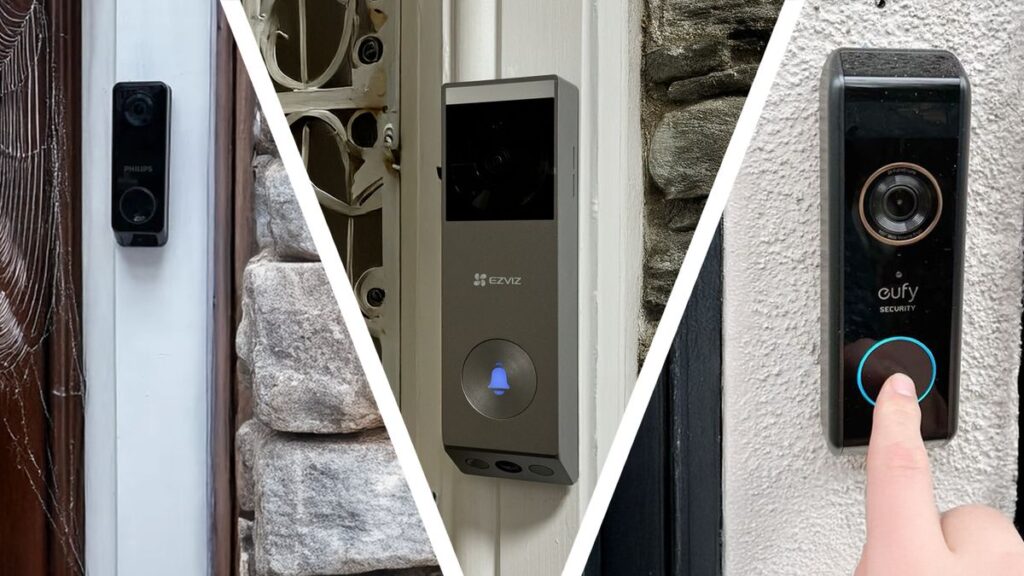
If you’ve read our renters guide to smart home devices, you already know that video doorbells no longer require permanent wiring to be useful. That’s opened the category up to a much wider range of buyers. However, it’s also made the decision harder, since there are now more models, subscription plans, and installation types to compare than ever. So let’s break down the best smart video doorbells available in 2026, and more importantly, how to figure out which type actually fits your situation.
What Actually Matters When Comparing Video Doorbells
Before naming specific models, it helps to understand the handful of factors that separate a good fit from a frustrating one:
- Wired vs. battery-powered. Wired models connect to your existing doorbell circuit and never need charging, but they require some basic electrical work. Battery models install in minutes with no wiring, at the cost of periodic recharging.
- Cloud storage vs. local storage. Most doorbells require a subscription to save video clips longer than a short rolling window. Some models offer local storage instead, avoiding a monthly fee entirely.
- Ecosystem compatibility. As we covered in our Alexa vs Google Home vs Apple HomeKit comparison, doorbells vary in which voice assistants and apps they integrate with.
- Field of view and resolution. Wider viewing angles catch more of your porch, while higher resolution matters most if you need to identify faces or read details like a package label.
Ring: The Category’s Best-Known Name
Ring remains the most recognizable brand in this space, largely because it was one of the first to popularize the category, and it now offers both wired and battery-powered models across a wide price range.
Strengths:
- The widest lineup of models, from entry-level to premium.
- Broad third-party integration, including with Alexa (which makes sense, since Amazon owns Ring).
- A well-established neighborhood alert feature that shares relevant local safety posts from nearby users.
Trade-offs:
- Most useful features, including video history beyond a live view, require a paid Ring Protect subscription.
- Historically faced criticism over law enforcement data-sharing practices, which is worth reviewing in Ring’s own privacy documentation if that’s a concern for you.
Best for: buyers who want the widest range of price points and don’t mind paying for a subscription to unlock full functionality.
Google Nest Doorbell: Best for Google Home Households
The Nest Doorbell integrates tightly with Google Home and Google Assistant, and it offers both a battery-powered and a wired version depending on your installation preference.
Strengths:
- Smart, AI-based alerts that can distinguish between a person, package, vehicle, or animal, reducing unnecessary notifications.
- Clean, well-organized app experience consistent with the rest of Google’s smart home lineup.
- A limited free tier that includes some event history, even without a subscription.
Trade-offs:
- Full 24/7 recording history and advanced familiar-face recognition require a Nest Aware subscription.
- Smaller third-party ecosystem than Ring, since Google prioritizes its own integrations first.
Best for: households already using Google Home who want strong AI-based alerts without juggling a separate app.
Eufy: Best for Avoiding Subscriptions
Eufy has built its reputation specifically around local storage, letting many of its doorbell models save footage directly to a home base station or built-in storage rather than the cloud.
Strengths:
- No mandatory subscription for core recording and playback in most models.
- Competitive pricing compared to Ring and Nest at similar feature tiers.
- Reasonably strong battery life, thanks to efficient motion detection design.
Trade-offs:
- Smaller companion ecosystem overall, with fewer accessories and third-party integrations than Ring.
- Cloud backup, if you want an off-site copy for insurance purposes, is typically a separate paid add-on rather than the default.
Best for: privacy-conscious buyers, and anyone who specifically wants to avoid an ongoing monthly fee.
Arlo: Best for an Existing Arlo Security Setup
If you already own Arlo cameras elsewhere on your property, their video doorbell slots neatly into the same app and subscription plan, avoiding the need to juggle multiple security apps.
Strengths:
- Seamless integration if you’re already using Arlo cameras for whole-home coverage.
- Strong night vision and color recording in low light, a frequent highlight in independent testing.
- Flexible subscription tiers that can cover multiple devices under one plan.
Trade-offs:
- Less compelling as a standalone purchase if you don’t already use other Arlo devices.
- Like Ring and Nest, most advanced features sit behind a subscription.
Best for: buyers who already have, or are planning, a broader Arlo security camera setup.
Side-by-Side Comparison
| Ring | Nest Doorbell | Eufy | Arlo | |
|---|---|---|---|---|
| Installation options | Wired & battery | Wired & battery | Mostly battery | Wired & battery |
| Subscription required for history | Yes | Yes (partial free tier) | No (local storage) | Yes |
| Best ecosystem fit | Alexa | Google Home | Standalone | Arlo ecosystem |
| Standout feature | Widest model range | Smart AI alerts | No subscription needed | Existing Arlo integration |
Do You Need a Subscription?
Not necessarily, but it depends on what you actually want from the device. If you’re happy with a live view and instant motion alerts, several models function reasonably well without a subscription. However, if you want to review footage from earlier in the day, such as checking who rang the bell three hours ago, most cloud-based brands require a paid plan to unlock that history.
This is precisely where Eufy’s local-storage approach stands out, since it includes that history by default rather than gating it behind a monthly fee.
Our Recommendation by Situation
- Renting, want the simplest possible setup → a battery-powered model from any brand, since none of them require wiring.
- Already using Google Home → Nest Doorbell, for the tightest integration.
- Want to avoid subscriptions entirely → Eufy, thanks to local storage.
- Already own security cameras from one brand → stick with that brand’s doorbell to keep everything under one app.
- Want the widest range of price points to choose from → Ring, simply due to its sheer number of models.
Final Thoughts
There’s no single «best» video doorbell that fits everyone, since the right choice depends heavily on whether you already use a specific ecosystem, how you feel about subscriptions, and whether you’re renting or own your home. Whichever you choose, prioritize the installation type and storage approach that fits your situation first, then let brand and price break the tie.
Setting up a doorbell as part of a renter-friendly security setup? Revisit our renters guide to smart home devices for more no-installation options to pair with it.