A smart thermostat is one of the few smart home upgrades that can pay for itself. It runs around the clock and manages your largest energy load. The Best Smart thermostats 2026 earn that reputation only when they match your system, because compatibility matters more than any app feature. This guide compares the leading families by wiring, sensors, geofencing, learning and heat pump support. It also covers the install traps that turn a good purchase into a bad week.
Three questions sort almost every buyer into the right product. Does the wall have a common wire? What kind of heating and cooling do you run? Do you need sensors in rooms the thermostat cannot see? Answer those first, and the brand shortlist falls into place on its own.
How the Best Smart thermostats 2026 Differ
The label covers devices that diverge enormously once you look past the screen. Four capabilities separate a useful model from a connected dial, and each maps to a decision you can make before spending.
- System support. Heat pumps, multi-stage furnaces, dual-fuel setups and auxiliary heat each require explicit support in the compatibility list. A model that ignores your configuration can short-cycle the equipment or refuse to run.
- Power source. Most connected thermostats need a steady feed from the common wire. Some draw small amounts of power through the existing wiring instead. A few ship with an adapter kit for homes that lack the wire.
- Remote sensing. A wall unit reads the air beside it, which is rarely the room you care about. Remote sensors let the system average, follow or prioritise the rooms where people actually are.
- Automation style. Learning thermostats build a schedule from your behaviour, while others follow the schedule you set. Neither is better, because they suit different routines.
The C-Wire Question and What to Do Without One
The C-wire, or common wire, is the biggest single reason a smart thermostat installation fails at the last step. It carries continuous low-voltage power from the furnace to the thermostat. That feed runs Wi-Fi, a screen and sensors without draining batteries. Modern systems almost always include one, while older ones often do not.
Checking takes about two minutes. Turn off power to the HVAC system at the breaker and remove the front plate from the old thermostat. Photograph the terminals with their labels. If you find a wire marked C, you almost certainly have a direct path to most models.
No C-wire is a detour rather than a dead end, and you have three honest routes:
- An adapter or power kit. Some brands include a small module that repurposes an existing wire to supply power. This covers many older systems. Factory kits are model-specific, so confirm your setup first.
- A power-stealing design. Certain thermostats sip tiny amounts of current through the heating or cooling circuit. This works on many systems, but manufacturers list exceptions, so treat it as conditional.
- A new wire or a professional. If your system cannot spare power, an installer can pull a new cable or fit a dedicated transformer. That is real work, and it belongs in your budget.
Two system types deserve a warning. Two-wire and millivolt controls usually need a dedicated low-voltage thermostat rather than a standard smart model. They appear in older homes, gas fireplaces and radiant floors. Line-voltage electric baseboard heat is a separate category and cannot use a low-voltage unit. Our walkthrough on how to install a smart thermostat without an electrician covers the wiring steps in order.
Comparing Smart Thermostats by What Your Home Needs
Feature matrices reward whoever prints the longest list, so this table works from the other direction. Start with your situation, then check what to verify and which brand family fits. Two homes with the same furnace label can still differ inside.
| Your situation | What to verify first | Brand family to consider | Main caveat |
|---|---|---|---|
| Uneven temperatures across rooms | Multi-room remote sensors with occupancy detection | ecobee | Extra sensors raise the total; app is dense |
| No C-wire in the wall | Included power kit or a power-stealing design | ecobee kit or a Nest model | Not every system can share power |
| Heat pump or multi-stage system | Published compatibility list for your exact equipment | Honeywell Home | Confirm auxiliary heat wiring |
| Google household with a steady routine | Self-learning schedule and Google Home integration | Google Nest | No Apple Home support |
| Alexa home on a tight budget | Remote control and schedules, no sensors needed | Amazon Smart Thermostat | Alexa-only experience |
| Two-wire or millivolt control | Purpose-built low-voltage model | Brand-specific | Standard smart models will not work |
Brand families help you narrow the field, but one rule applies to every row. Confirm the exact model against the manufacturer’s compatibility tool, not the brand’s marketing page.
Brand Families at a Glance
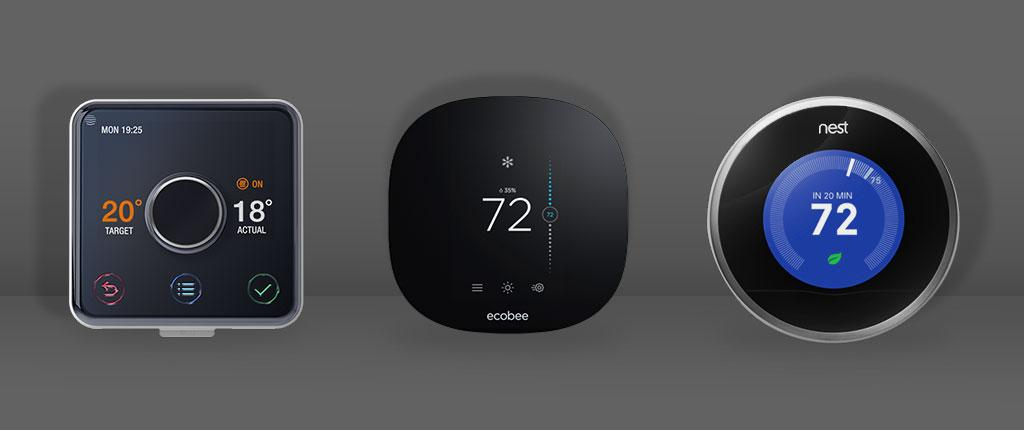
Four families dominate the conversation, and each has a clear centre of gravity. None is universally best, which is why the table starts from your home rather than a ranking.
- ecobee. Remote sensors are the core idea, so the line suits homes with uneven temperatures. Some models include an adapter kit for homes without a C-wire. In return, the hardware costs more, the app is denser than rivals, and extra sensors add to the total.
- Google Nest. The learning thermostat that made the category popular still leads on automatic schedules. Its design can work in some homes without a common wire. It fits Google households best, since Apple Home support is absent and the sensor approach prioritises one room.
- Honeywell Home. Decades of thermostat engineering show in the breadth of compatible systems. That makes this family the natural first stop for heat pumps, multi-stage equipment and unusual configurations. The trade-off is a functional rather than delightful experience.
- Amazon Smart Thermostat. A tight, budget-minded device that covers remote control and schedules through the Alexa app. It is the wrong choice outside an Alexa home and offers no room sensors or learning. It handles the essentials without clutter.
What they share is the honest ceiling on savings. No thermostat saves energy by itself. It saves energy by running a schedule that keeps the house cooler in winter or warmer in summer while nobody minds. If you are mapping the wider system, our breakdown of smart home hubs that support multiple brands shows how the pieces connect.
Install Traps That Ruin a Good Purchase
Most disappointing installations fail for reasons unrelated to the thermostat’s software. Watch for these before you spend anything.
- Boilers and hydronic systems. A forced-air thermostat may not understand your boiler’s terminals or pump logic. Check the manual for hydronic support.
- Zoned systems and multiple thermostats. Homes with dampers and several thermostats need each unit to respect the zone panel. One smart thermostat can fight the panel and leave rooms cold or overheated.
- Two-wire and millivolt controls. Older thermostats with only two wires, and millivolt setups on fireplaces or radiant heat, cannot power a Wi-Fi radio. These need a purpose-built low-voltage model.
- Auxiliary and emergency heat. On a heat pump, incorrect wiring of the auxiliary stage can disable backup heating or run it constantly. Either way, bills rise instead of falling.
- Ignoring the C-wire until the end. Buyers who confirm the wire after purchase often pay for an installer visit or return the unit. Check first, buy second.
None of this is exotic. A quick photograph of the old wiring answers most of the questions at once.
How to Measure Whether It Actually Saves
Savings claims deserve a sceptical ear, because a thermostat can only save what your habits and schedule allow. The ENERGY STAR smart thermostat program describes the category’s savings as real but modest, and it points to the setback temperatures that do the work. Behaviour drives the outcome, so no single figure applies automatically to your home.
To judge whether yours helps, gather three pieces of data. First, a baseline: two or three months of bills from before the switch. Second, the schedule itself, recorded in the app, so you can see the real setback temperatures. Third, heating and cooling degree days from a local weather source, because a mild month flatters any thermostat.
With those in hand, compare cost per degree day instead of the raw bill. A month that was warmer than last year will look cheaper no matter what you installed, so the adjustment keeps the comparison honest. Our guide to how much a smart thermostat can save on energy bills breaks down the variables and the realistic ranges. The ENERGY STAR thermostat FAQ answers the common questions directly.
One habit matters more than the hardware. A programmed setback while you sleep and while the house is empty delivers most of the benefit. The learning features and eco modes only automate a decision you could make yourself.
What to Check Before You Remove the Old Thermostat
The ten minutes before you unscrew anything protect you from the ten hours after. Work through this list while the old unit is on the wall.
- Photograph the wiring. Capture the terminals and their labels before a single wire comes loose. A clear photo removes almost all of the guesswork later.
- Note the system type and fuel. Record whether you have a heat pump, a furnace, a boiler or electric baseboard heat, plus any auxiliary or emergency heat.
- Count the stages. Multi-stage heating and cooling need a thermostat that supports the same number of stages, or you lose efficiency the old unit used.
- Check for a zone panel. A second thermostat, dampers or a panel in a closet signal a zoned system that needs care.
- Turn off the power. Cut the HVAC breaker before touching wires and confirm the system is dead at the unit.
- Keep the old thermostat. Store it with the wiring photo, in case you move out or need to reverse the change.
Renters should add one step and get written permission before modifying the landlord’s HVAC equipment. Replacing a thermostat is a real change to the property. For everyone else, this checklist turns a stressful swap into a routine one.
Frequently Asked Questions
Do smart thermostats need a C-wire?
Most do, because the common wire supplies steady low-voltage power for Wi-Fi, the screen and sensors. A meaningful minority of models can draw power through existing wiring instead, and some brands include an adapter kit. Confirm your configuration with the manufacturer’s compatibility checker before buying. It depends on the model and on your furnace or air handler.
Can I install one without a C-wire, or do I need an electrician?
Many homes work without the wire, using an included power kit or a power-stealing design. When neither suits your system, an installer can pull a new wire or fit a transformer. That is a small but genuine job. If you are comfortable switching off a breaker and matching labelled wires, a standard swap is usually a careful DIY task.
How much can a smart thermostat actually save?
Savings come from the schedule rather than the screen. Setbacks while you sleep and while the house is empty do the work. Independent programs such as ENERGY STAR describe the typical household benefit as real but modest. Your result depends on climate, energy price and consistency. Treat any single percentage as an illustration rather than a promise.
Will a smart thermostat work with a heat pump?
Only if the model explicitly supports heat pumps and, where relevant, auxiliary or emergency heat. Some thermostats list heat pump support in their compatibility documents, while others exclude it. Multi-stage and dual-fuel systems add the same requirement. Check the published list for your exact equipment, because the wrong thermostat can disable backup heat or run it constantly.
What should I check before removing my old thermostat?
Photograph the wire terminals and their labels, then note the system type and fuel. Count the heating and cooling stages. Look for a zone panel or a second thermostat. Finally, cut power at the breaker and confirm the system is off. Keeping the old unit and its photo makes any future reversal simple.
Do I need a hub or a subscription?
Usually not. Most smart thermostats connect directly over Wi-Fi and work through their own app. Many also integrate with Alexa, Google Home, Apple Home or Matter without extra hardware. A hub only matters if you choose a protocol-based model, and subscriptions are rare here. Read the feature list anyway, because a few reports may sit behind a plan.
Final Thoughts
Choosing among the Best Smart thermostats 2026 comes down to three checks before any feature comparison. Confirm the common wire or a workable alternative. Match the model to your heating and cooling equipment. Decide whether you need remote sensors in rooms the wall unit cannot read. Then set a schedule you will actually keep, because that habit shows up on the bill.
Wiring sorted and the schedule running? Balancing airflow across rooms is the next lever, and our guide to smart vents and zoning explains when it helps and when it does not.
Updated 7 October 2026: this guide was rewritten and expanded, with a decision checklist, a comparison table, compatibility notes and an FAQ added.
Written by Ángel D. Serrano, who runs Automating Our Home. Finishing a philosophy degree, a patient reader of manuals, and the person who has broken more smart plugs than he will admit. He writes the guides so you only have to decide once.