Few upgrades deliver as much convenience per dollar as a smart plug. It looks like an adapter, installs in seconds, and turns a dumb appliance into something you can schedule and control from your phone. However, the marketing makes these devices sound more magical than they are. A smart plug does exactly one thing: it cuts or restores power to whatever is plugged into it. Here’s smart plugs explained without the jargon, covering how they work, the best uses, and the safety limits that most articles skip.
Smart Plugs Explained: What They Actually Do
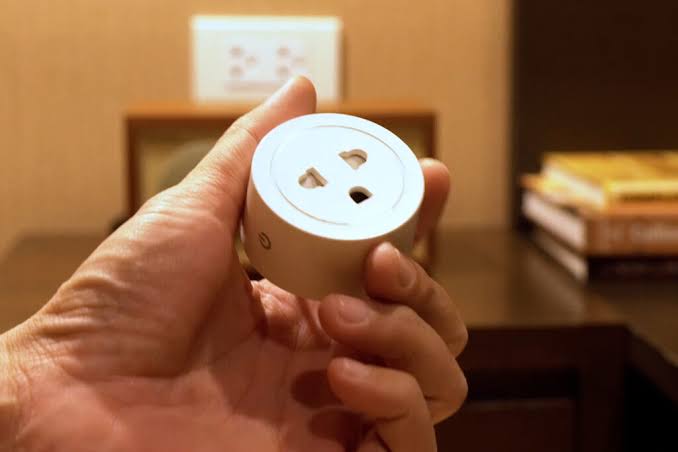
Think of a smart plug as a remote-controlled switch that lives in your wall outlet. You plug the plug into the socket, connect it to your Wi-Fi, and then control it from an app or with your voice. When you switch it off, the appliance plugged into it loses power, exactly as if you had pulled the plug.
That simple action unlocks surprisingly useful habits. A lamp can turn on before you wake. A fan can switch off after three hours. A coffee maker can start heating at 7 a.m., as long as its own switch is left on.
Picture a typical evening. You’re on the couch, the lamp across the room is on, and you forgot to switch off the one upstairs. With plugs, one voice command or a single tap in the app handles both. The next morning, a schedule turns the bedroom lamp on five minutes before your alarm. The routine costs nothing beyond the initial setup, and it runs whether you remember it or not.
Two limits are worth knowing. First, a standard smart plug only switches power on or off, so it cannot dim a lamp or control the temperature of a heater. Second, the appliance needs to turn on automatically when power returns. That’s why plugs work best with lamps and switch-operated devices, rather than gadgets with soft power buttons.
How a Smart Plug Works
Inside the plastic case sits a relay, which is simply a switch, plus a radio that receives commands. Most plugs connect directly to your home’s Wi-Fi, while some use a hub-based standard like Zigbee or Matter over Thread. TP-Link, the maker of the popular Kasa line, offers both Wi-Fi and Matter-certified models, and the category is steadily converging on Matter for cross-ecosystem compatibility.
When you tap the app, the command travels to the plug, and the relay closes or opens the circuit. Schedules and timers do the same thing automatically, and they work even when you’re away, since control happens over the internet.
Two practical details matter at purchase time. Many plugs only join 2.4 GHz Wi-Fi, so a router that hides that band will cause setup headaches. Meanwhile, some models measure power draw and report it in the app, which turns the plug into a small energy monitor.
In short, a smart plug is a relay with a radio and some software. Everything from voice commands to vacation schedules is just a smarter way of flipping that switch.
What to Look for in a Smart Plug
- Current rating. Most indoor plugs handle 15 amps, which covers lamps, fans, and TVs. Check the rating before you connect anything heavier.
- Energy monitoring. Worth the small extra cost if you want to see what a device actually consumes.
- Size and design. Mini plugs fit snugly, while bulky models block the second outlet in a duplex socket.
- Connectivity. Wi-Fi direct is simplest; Matter or Zigbee suits homes with hubs or Thread networks.
- Ecosystem support. Confirm Alexa or Google compatibility, and check Apple Home support model by model.
- No subscription. Plugs from reputable brands control fully through the app with no monthly fee, and that never changes.
In practice, the differences between reputable brands matter less than the checklist above. Any plug from an established maker, with the rating you need and the assistant you use, will serve you well. Therefore, choose on size, energy monitoring, and price rather than brand loyalty.
The Best Uses for Smart Plugs
- Lamps and presence simulation. Schedule living room lamps to mimic your routine while you’re away, which makes an empty house look occupied.
- Morning coffee. A switch-operated coffee maker on a schedule means fresh coffee when the alarm goes off.
- Holiday lights. Timers replace the outlet timer you always forget to set, and voice control turns the tree on without bending down.
- Fans and humidifiers. Set a bedtime fan to run for two hours, then shut off while you sleep.
- Older TVs and soundbars. Cutting standby power on legacy AV gear saves a little energy, though the honest savings are modest for modern electronics.
- Workshop and bench tools. A plug near the workbench switches off an entire tool station with one tap.
- Grow lights and seedling mats. Timers keep plants on consistent light cycles, which indoor gardeners appreciate.
- Pet routines. A switch-operated fountain or a light schedule keeps routines running during late shifts.
The common thread: plugs shine when an appliance has a manual switch you can leave on, so the plug becomes the brain.
Safety: What Not to Plug In
- Space heaters. They draw near the limit of most plugs, and a faulty relay can create heat you don’t want.
- Kettles, irons, toasters, and hair dryers. High-current appliances belong in the wall socket directly, not through a smart plug.
- Refrigerators and freezers. Compressors dislike interrupted power, and a schedule could leave food thawing.
- Washers, dryers, and dishwashers. These need dedicated circuits, not adapters.
- Daisy-chaining. Never stack a smart plug into a power strip, or a strip into a smart plug.
The rule is simple: if an appliance draws more power than the plug’s rating, it doesn’t belong there. Check the label on the appliance and the rating on the plug before connecting anything, and keep smart plugs indoors unless the box says otherwise.
Setting Up a Smart Plug in Ten Minutes
Setup is genuinely easy, and it follows the same pattern across brands:
- Choose the socket. Pick an outlet near the appliance, and leave the plug reachable in case you need to reset it.
- Install the app and create an account. Most brands guide you through pairing with a scan or a button press.
- Use the 2.4 GHz band. Many plugs only join 2.4 GHz Wi-Fi, so enable that band on the router before pairing.
- Name the plug clearly. Call it “living room floor lamp,” not “plug one,” since voice commands depend on the name.
- Test voice and app control. Say the command out loud once, and confirm the schedule works before relying on it.
- Enable updates. Keep the plug’s firmware current, since patches fix the kind of issues that later make headlines.
If pairing fails, the usual culprit is the Wi-Fi band. Temporarily enable 2.4 GHz on the router, pair the plug, and re-enable the combined network afterward.
Common Mistakes New Owners Make
- Plugging in a space heater. The most common and most dangerous mistake, and the reason ratings exist.
- Leaving the appliance switch off. A schedule cannot turn on a lamp whose own switch is off.
- Blocking the second outlet. A bulky plug makes the socket beside it useless.
- Using an indoor plug outdoors. Rain and outlets do not mix, so check the box for outdoor ratings.
- Expecting dimming. Standard plugs switch power; they don’t dim lights or control heaters.
- Forgetting old appliances. A vintage radio or an aging adapter may draw far more than its size suggests.
Do Smart Plugs Save Energy?
The honest answer: a little, for some devices, and less than the ads imply. Electronics left in standby still draw power, a drain sometimes called vampire power. Consumer watchdogs note that standby losses can add 5 to 10 percent to a typical home’s electric bill. Some homes see even more, according to the Ohio Consumers’ Counsel.
A smart plug cuts that waste for whatever you attach to it. However, most modern devices sleep efficiently, so the savings rarely justify the purchase on their own. The real value of energy-monitoring plugs is information: once you see that an old receiver draws power all night, you’ll switch it off for good. In other words, buy plugs for convenience and automation, and treat the energy savings as a small bonus, not the main reason.
Smart Plugs vs Smart Bulbs vs Smart Switches
New buyers often confuse the three, so here’s the shortest version:
- Smart plugs control whatever is already plugged into an outlet, with zero installation. They’re ideal for lamps, appliances, and renters.
- Smart bulbs replace the bulb and control light itself, including dimming and color. We covered the current models in our best smart bulbs guide.
- Smart switches replace the wall switch and control the whole light circuit, but they need wiring work and sometimes a neutral wire.
The practical rule: if you want to control a lamp’s light, buy a bulb. If you want to control an appliance or a lamp you can’t change, buy a plug. Switches are for owners who want permanent, invisible upgrades.
Our Recommendation by Situation
- Testing the waters with one device → a single basic plug for a lamp, to learn the app habits.
- Renting and moving soon → plugs only, since they travel and leave no trace.
- Controlling lamps around the house → consider smart bulbs instead, which dim and change color.
- Curious about power use → a plug with energy monitoring, to expose the real consumers.
- Outdoor holiday lights → an outdoor-rated plug, never an indoor model.
- Any high-wattage appliance → no plug at all; use the wall socket directly.
Final Thoughts
Smart plugs explained in one line: they give your everyday appliances a schedule, and they ask for nothing in return. No subscription, no rewiring, no hub required on most models. Start with one plug on one lamp, build a routine that saves you effort, and expand from there. Just respect the power ratings, keep heaters off the list, and the smartest thing about your home will quietly be the sockets.
Plugs and bulbs handle the basics. Sensors, cameras, and locks handle the rest. Our DIY smart home security system guide shows how the layers fit together.
Written by Ángel D. Serrano, who runs Automating Our Home. Finishing a philosophy degree, a patient reader of manuals, and the person who has broken more smart plugs than he will admit. He writes the guides so you only have to decide once.