If you have read our beginner’s guide to smart homes, you already know the ecosystem is the first decision worth getting right. Here is the honest version: Comparison between Ecosystems is not about which assistant sounds cleverest in an advert. It comes down to what you can buy and what still runs when the internet drops. It also depends on how much data leaves your home and how painful changing your mind later would be.
Matter and Thread have made this choice less permanent than it once was, but less permanent does not mean unimportant. Amazon Alexa, Google Home and Apple HomeKit still diverge on device support, automation depth, privacy defaults and the real cost of walking away. This guide works through each difference with a comparison table, notes for different homes and phones, and a decision checklist you can actually use.
The Short Answer, Household by Household
If you want the conclusion before the reasoning, start here:
- Choose Amazon Alexa if you want the widest catalogue of devices, the lowest entry cost, and you can live with a busier app.
- Choose Google Home if your household runs on Android and you care most about voice recognition and a clean everyday experience.
- Choose Apple HomeKit if everyone uses Apple devices, privacy comes first, and you accept fewer options at a higher price.
- Mix selectively only when one specific device refuses to work any other way and you are willing to juggle more than one app.
The rest of this guide explains where each of those lines comes from.
Where the Real Comparison between Ecosystems Happens
A side-by-side list of features only helps if the rows are the ones that change daily life. These are the six that decide most real setups.
| Factor | Amazon Alexa | Google Home | Apple HomeKit |
|---|---|---|---|
| Device compatibility | Widest third-party catalogue | Wide and growing fast | Narrower, expanding through Matter |
| Assistants and speakers | Echo range at many price points, including budget dots | Nest speakers and displays, tied closely to a Google account | HomePod and HomePod mini only, at the higher end |
| Automation depth | Deep routines and skills, occasionally cluttered | Deep, strong with accounts and presence | Deep but stricter, excellent local scenes |
| Hub requirement | Cloud-first, with hubs built into newer displays | Cloud-first, with hubs inside several speakers | A HomePod or Apple TV is needed for many features |
| Privacy by default | More cloud processing and more data collected | Cloud processing with moderate controls | Local-first, strongest out of the box |
| Cost of switching later | Moderate, plenty of reuse options | Moderate | Highest, because certified hardware costs more |
Two of those rows deserve more space than a table can give them. Privacy and the cost of switching are the ones buyers underestimate most, and both are covered below.
Devices, Assistants, and Speakers: What Really Differs
Comparison between Ecosystems decides more than what works today; it sets the ceiling on what you can add next year. Device support is the most visible difference. Alexa’s catalogue is the oldest and largest, so almost anything on a shelf carries an Alexa label. Google’s list has grown quickly and now covers most mainstream categories. HomeKit’s list is the shortest, though Matter has widened it for lights, plugs, locks and sensors.
The assistant itself. In everyday use, Google’s voice recognition tends to handle follow-up questions and natural phrasing most reliably. Alexa sits close behind and keeps improving. Siri has historically been the weakest of the three at loose commands, so HomeKit owners lean on scenes and the Home app instead of voice.
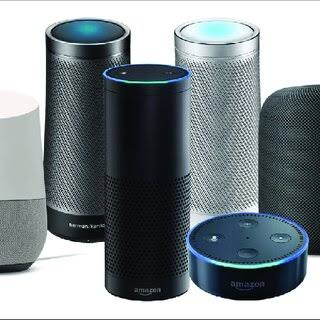
Speakers and entry points. Alexa has the broadest speaker line, including cheap Echo Dots that make it easy to put one in every room. Google’s Nest range is smaller but tightly woven into Android and Google services. Apple offers only the HomePod and HomePod mini, so the cheapest route into HomeKit still costs more than the cheapest Echo or Nest. If speakers matter most to you, our comparison of the best smart speakers goes deeper.
What Weighs More for Your House and Your Phone
Your phone is the real starting point
If every adult in the house carries an iPhone, HomeKit removes friction that no other platform can match. If Android dominates instead, Google Home fits the same way. A genuinely mixed household is the tricky case, because HomeKit is Apple-only. In that situation, Alexa or Google works better as a shared default that everyone can use without missing half the features.
House size and layout
A large, multi-floor home rewards deep automations and reliable local control, and it also exposes weak Wi-Fi. Hundreds of Wi-Fi devices can strain a router, while mesh protocols such as Thread and Zigbee spread load across the house. A small flat needs far less, and a single good speaker plus a couple of cheap devices may cover everything you actually want.
Renters and owners
If you rent, favour devices that need no wiring and no landlord approval, because you will move them eventually. If you own the place, you can invest in hubs, wired switches and sensors. A platform that supports upgrades for years pays off more here.
Automations That Keep Working When the Internet Drops
No Comparison between Ecosystems is complete without asking what happens when the router dies. Cloud-first platforms route most automations through remote servers, so when broadband fails, app control and voice often stop even though the lights still switch manually. Local execution is the fix, and it is exactly where the three platforms differ.
HomeKit leans local. With a home hub such as a HomePod or an Apple TV, many scenes run inside your own network. That means they survive an outage. Alexa and Google increasingly run some Matter and Thread routines locally too. Coverage varies by device and firmware version, so the honest answer is to test your own setup.
What usually survives offline. Physical wall switches, locally stored schedules and direct device-to-device links keep working. What usually stops is voice control, remote app access, and anything that depends on a cloud service or a paid subscription.
Mixing Ecosystems: Matter, Thread, and the Traps
Mixing works better than it did a few years ago, but the traps have not disappeared. Matter is the reason compatibility improved, yet a standard is not the same as an identical experience. Keep these pitfalls in mind before you split a home across two platforms.
- Matter is not one experience. A device that appears in all three apps may expose fewer features in some. The same bulb can lose effects or energy reporting depending on the ecosystem.
- Thread needs a border router. Matter over Thread hardware requires one, and some speakers and hubs include it while others do not. Add a second border router carelessly and you can end up with two separate Thread networks that ignore each other.
- Automations do not cross apps. A motion sensor in one app cannot natively trigger a light in another. Cross-ecosystem logic usually needs an open platform such as Home Assistant.
- Two apps mean two jobs. Sharing access, guest control and firmware updates all double once you split platforms, and every new device forces the same question again.
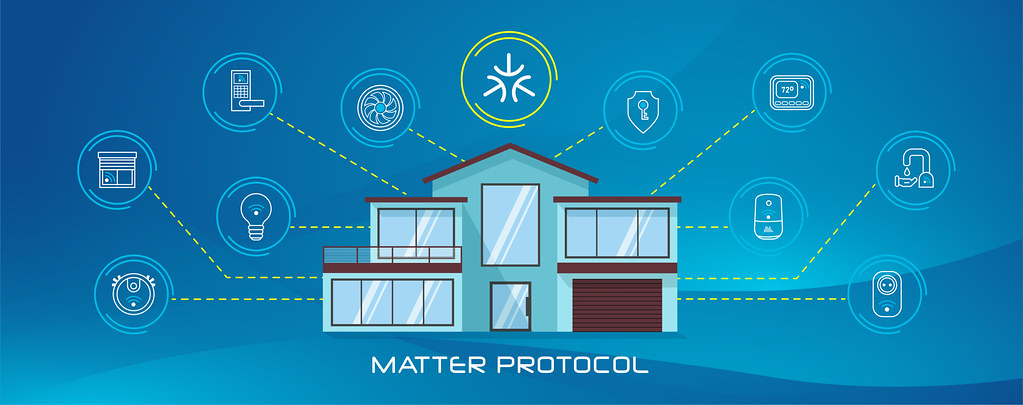
Our explainer on what Matter means for a smart home covers the standard in plain terms. In short, mixing is a bridge for one stubborn device, not a strategy for a whole home.
What Happens When an Assistant Loses Support
Platforms retire features and hardware lines over time, and the pattern is consistent enough to plan around. The device usually keeps its basic local function, while cloud-linked features such as voice control, remote access or third-party integrations quietly disappear. That is the real risk of buying something locked to a single company.
How to reduce the risk. Prefer devices that speak open standards so they can be re-homed to another ecosystem later. Keep a local controller option in mind for anything important. Avoid depending on one exclusive cloud feature for something you rely on daily. A hub that talks to many protocols is the cheapest insurance against an ecosystem shifting under you. It also keeps your options open as your home grows.
None of this means the sky is falling. It means you should own your devices rather than rent control of them from one app that can change its rules without asking.
A Decision Checklist for the Undecided
Work through these six questions in order and the answer usually surfaces on its own.
- Start with your phones. List the phones everyone actually uses daily. A majority of iPhones points to HomeKit, a majority of Android phones points to Google, and a genuine mix points to Alexa or Google.
- Rank privacy honestly. If local processing is a hard requirement, HomeKit wins. If you accept cloud processing for convenience, Alexa or Google are perfectly reasonable.
- Count your rooms. More rooms reward a large device catalogue and cheap speakers, which favours Alexa.
- List what must work offline. If lights and locks have to keep running without internet, prioritise local execution and a hub.
- Check your must-have device. Find the one device you really want, then confirm which ecosystems support it fully rather than partly.
- Estimate the exit. If you might switch later, favour Matter and Thread hardware so your devices can follow you.
Answer those six and the choice stops feeling like a gamble.
Frequently Asked Questions
Is Alexa, Google Home, or HomeKit best overall?
There is no single winner, because the best pick depends on your phones, your privacy needs and the devices you already own. For most first-time buyers with no strong preference, Alexa is the safest default thanks to its catalogue and pricing. Android households usually prefer Google Home, and Apple households that value privacy should choose HomeKit.
Does Matter make the choice irrelevant?
No. Matter widens device compatibility and lowers the cost of switching, which is a real benefit. It does not, however, change voice recognition quality, app design or privacy defaults, because those belong to the ecosystem rather than the device. Treat Matter as reducing lock-in, not as removing the differences between the three platforms.
Can I run two ecosystems in one home?
Yes, and plenty of people do, usually with an Echo in the kitchen and a HomeKit lock on the front door. The catch is maintenance. Pick one platform as your primary system for voice and automations, then use the second only for a specific device. Keep your automations in one place so you are not debugging two apps every time something breaks.
Which ecosystem works best without internet?
HomeKit with a home hub tends to execute more automations locally, so more of your setup survives an outage. Alexa and Google increasingly run some Matter routines on-device or on a local hub, but coverage depends on the device and firmware. The practical test is simple: unplug the router and see which automations still fire.
How expensive is it to switch ecosystems later?
Costs come from replacing hub-dependent hardware, re-pairing devices and rebuilding automations, so there is a real cost of switching ecosystems after you commit. If most of your gear uses Matter or Thread, switching is largely software and an afternoon of patience. If your devices are locked to one brand’s cloud, expect to replace more of them.
Do I need a hub at all?
Not always. Wi-Fi devices work without one, so a small setup can start with nothing extra. Hubs add local execution, better reliability and support for Zigbee, Z-Wave, Thread and Matter. If you plan to grow beyond a handful of devices, a hub is usually worth the small upfront cost.
Final Thoughts
There is no universally correct answer to the Alexa versus Google Home versus HomeKit question. The right choice depends far more on the phones your household already carries and the value you place on privacy than on any objective ranking. If you are still unsure, Alexa is the safest default for most first-time buyers because of its catalogue and price point. If you already live inside Apple’s world, skipping the detour and going straight to HomeKit is the more logical move.
Whichever you pick, remember that hardware matters more than branding. Choose devices that speak open standards and keep your automations independent of any single cloud. Also test what still runs when the internet drops. Do that, and switching later stays a manageable project rather than a painful restart.
Still weighing it up? Our guide to the best hubs for multiple device brands shows how one controller can keep every ecosystem open at once.
Updated 7 October 2026: this guide was rewritten and expanded, with a decision checklist, a comparison table, compatibility notes and an FAQ added.
Written by Ángel D. Serrano, who runs Automating Our Home. Finishing a philosophy degree, a patient reader of manuals, and the person who has broken more smart plugs than he will admit. He writes the guides so you only have to decide once.