Step into a room and the lights come on before you reach the switch. Ask a speaker to lower the heating while you stay on the sofa, and it happens without you standing up. What is a Smart Home, then? It is a house where everyday devices connect to the internet or to each other. As a result, they can be controlled remotely, scheduled, or left to react on their own.
The idea is simple, but the shopping is not. Dozens of brands, several wireless standards, and a wall of jargon make the first purchase harder than it should be. This guide explains what a smart home really is, how the four device families differ, and in what order to buy things.
What is a Smart Home, in Plain English
At its core, a smart home is a layer of software wrapped around hardware you already understand. A bulb still lights a room, a plug still passes power, and a lock still secures a door. What changes is the reach: each device can be controlled from an app, a voice assistant, or a rule that runs on its own.
Every setup is built from three layers. The devices do one job each. The connection carries the commands, whether that uses Wi-Fi, Zigbee, Z-Wave, Thread, or Matter. The control layer ties everything together, usually through an app, a speaker, or an automation platform.
Two clarifications save beginners money. There is no minimum number of gadgets to own and no certificate to earn. One smart plug on a coffee maker is already a smart home. Also, smart does not mean better at the basic job, and a cheap connected bulb often loses on light quality to a good ordinary one.
The Four Families of Smart Devices
Nearly every product on the shelf belongs to one of four families. They solve different problems, and confusing them is the fastest way to buy the wrong thing.
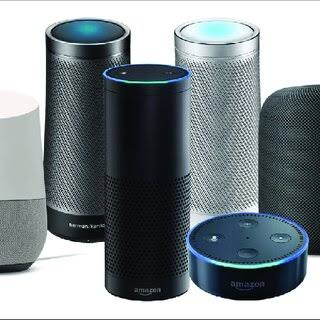
Control: speakers, displays, buttons and apps
This family is the interface between you and everything else. Speakers, displays, wall buttons and the phone app all sit here.
- What it solves. Hands-free control and one place to see devices and routines.
- What it does not solve. A new speaker cannot control hardware you have not bought, and it cannot make two incompatible brands cooperate.
Security: cameras, doorbells, locks and sensors
These devices watch the edges of a home and the entry points you care about most. They also build a record you can check later.
- What it solves. Knowing what happened while you were out, and seeing who is at the door before you open it.
- What it does not solve. It does not replace good locks or lighting, and an alert only helps if someone acts on it.
Lighting and plugs: the easiest entry point
Bulbs, switches, strips and plugs change the mood of a room and put the things you already own on a schedule.
- What it solves. Timers, scenes and remote control for lamps, fans, heaters and coffee makers.
- What it does not solve. It cannot fix poor lighting design, and a basic plug cannot dim a lamp or report much beyond on and off.
Climate: thermostats, vents and air treatment
Heating and cooling take the largest share of a typical energy bill, which is why these devices attract so much attention.
- What it solves. Comfort on a schedule, remote adjustment, and finer control of a heating or cooling system.
- What it does not solve. It cannot fix a draughty house or an undersized system, and savings depend on your home and habits.
| Family | Typical devices | What it solves | What it does not do | Needs a hub? |
|---|---|---|---|---|
| Control | Speakers, displays, buttons | Voice and app control, routines | Control devices you have not bought | Often acts as one |
| Security | Cameras, doorbells, locks, sensors | Remote awareness, entry control | Guarantee safety or door strength | Sometimes, for local storage |
| Lighting and plugs | Bulbs, switches, strips, plugs | Schedules, scenes, remote power | Dim loads that are not dimmable | Rarely, on Wi-Fi models |
| Climate | Thermostats, vents, fans, purifiers | Comfort scheduling, remote control | Fix insulation or system sizing | Rarely; wiring matters more |
Do You Need a Hub? How to Decide
The most common beginner question has an honest answer: not always, and not on day one for most people.
- Protocol decides first. Wi-Fi devices talk straight to your router, so they need no extra box. Zigbee and Z-Wave speak a low-power language your router does not understand, so they need a bridge.
- Thread blurs the line. Thread is low-power too, but it needs a border router. Many speakers and hubs already include one, so that cost is often already paid.
- Matter changes the question. A Matter device can be added to more than one ecosystem, so brand lock-in keeps shrinking rather than growing.
- App fatigue is the real trigger. If you open four apps to run one evening routine, that is the moment a hub starts saving you time.
- Local control is the power-user reason. A hub can keep automations running when the internet drops, and platforms such as Home Assistant are built around that idea.
My advice for a first setup is still to wait. Start with two or three Wi-Fi devices, learn how routines behave, then add a hub if you outgrow your router and a speaker. For a longer treatment, see our guide on whether you need a hub for your smart home.
Getting Brands to Talk to Each Other
The fear that gear from different companies will not cooperate is reasonable, because it used to be true. It is far less true today, and three questions settle almost every case.
- Which protocol does it speak? If it uses Wi-Fi, it works with your router. If it uses Zigbee or Z-Wave, it needs a hub that speaks the same language.
- Which ecosystem does it support? Check the exact model against Alexa, Google Home or Apple Home. One brand can support an ecosystem on one product and not on another. Our comparison of the three main ecosystems covers what changes if you switch later.
- Does it need its own app or account? Some devices still demand a manufacturer app for setup, updates and history, even when voice control works fine.
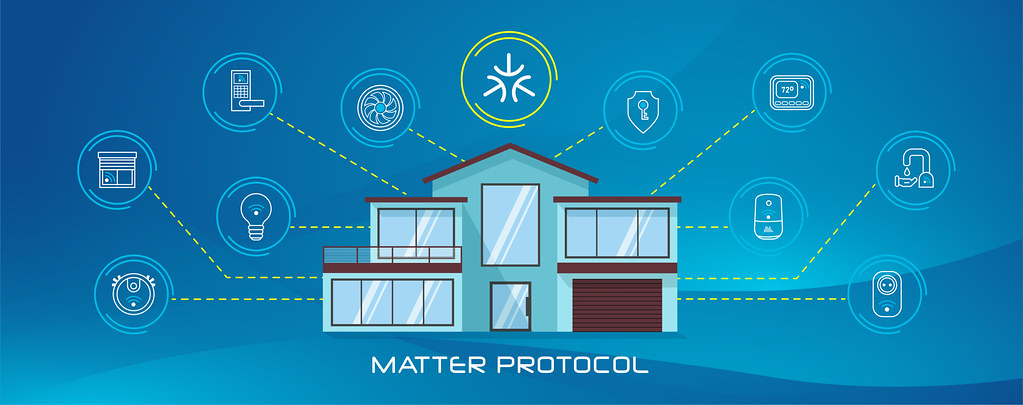
Matter is the shorthand answer to most compatibility worry. It is a shared standard from the Connectivity Standards Alliance, and a Matter device is designed to pair with more than one platform. That does not make every product equal, because features such as video history may still live only in the maker’s app.
A Realistic Buying Sequence
Buying everything at once is the most expensive mistake in this hobby. Hardware sits in a box, the return window closes, and nothing feels finished. Three waves work far better.
Wave one: a speaker or display, a couple of plugs, one bulb
This wave is about control and one solved annoyance. A speaker or display becomes your main interface. A smart plug puts a lamp or a fan on a schedule, and a bulb lets you test scenes in one room.
Wave two: extend lighting and add awareness
Once a routine has stuck for a few weeks, repeat it in another room. Add a camera or a video doorbell at the entrance you actually use, and consider a smarter thermostat if your heating system suits one.
Wave three: locks, sensors and a hub
Locks, contact sensors, motion sensors and a dedicated hub come last. They reward a setup you already understand, and they are the most disruptive to install. As a result, buying them early rarely pays off.
A low-cost first install can stay genuinely small. One speaker or display, two smart plugs for lamps you already own, and one or two bulbs for the main room are enough. That bundle usually costs less than a single mid-range smart thermostat.
Beginner Mistakes and What They Really Cost
- Buying a pile of devices before one routine works. The cost is unopened boxes and a budget spent on hardware you cannot use yet.
- Ignoring protocols and ecosystem support. The cost is two systems that never share an alert, which usually means buying the same thing twice.
- Blaming the gadgets for weak Wi-Fi. A distant router is the usual cause of dropped devices, and the cost is hours spent troubleshooting the wrong component.
- Overlooking subscriptions. Cameras and doorbells often lose their history without a plan, so the cost is a monthly fee that was never in the original budget.
- Skipping basic security. Default passwords and stale firmware are how cameras end up exposed, and the cost can reach well beyond the device itself.
- Fitting smart switches without checking the wiring. Many homes lack a neutral wire at the switch, so the cost is a return or an electrician’s visit.
Privacy and Your Data From Day One
Every connected device collects something. A camera records video, a speaker keeps voice requests, and a thermostat logs when you are home. That is not automatically sinister, but it deserves the same care as the device itself.
Four habits cover the basics, and they take minutes rather than weekends.
- Change the default credentials. Factory logins are published, so replace them before a device ever goes online.
- Turn on two-factor authentication for the account behind each brand, because a camera feed is only as safe as the login protecting it.
- Keep firmware current. Updates often patch the exact flaws attackers rely on, and they are usually a single tap in the app.
- Check what leaves your home. Look for cloud recording, voice history and guest sharing in the settings, then switch off what you never use.
Local processing is worth a look when you compare models. It keeps footage or voice data on your own network instead of a company server. The FTC’s guidance on securing connected devices is a practical checklist. Our guide to what data your smart home devices collect goes deeper on the trade-offs.
Frequently Asked Questions
Do I need a hub to start a smart home?
No. Two or three Wi-Fi devices, such as a plug and a bulb, work through your router and an app with no extra hardware. You only need a hub when you choose Zigbee or Z-Wave devices. A hub also helps when you want automations to keep running locally, without a cloud service in the middle. For most beginners, the jargon is bigger than the problem.
What is a Smart Home going to cost me to start?
A starter setup can stay modest. One speaker or display, two smart plugs, and a bulb or two usually cost less than a single mid-range smart thermostat. The bigger expense arrives later, when you add cameras, locks or a thermostat, so spending in waves keeps the total predictable and easy to adjust.
Will devices from different brands work together?
Often, if you check three things first: the protocol, the ecosystem, and whether the device needs its own app. Wi-Fi and Matter products are the easiest to mix, while Zigbee and Z-Wave need a matching hub. Check the exact product rather than the brand, because support varies by model and by region.
Do smart home devices work without the internet?
It depends on where the automation runs. Local routines keep working when the connection drops, and a hub built for local control does too. Cloud features, such as remote viewing or voice commands, stop until the internet returns. Treat a device that fails completely offline as a limitation you may want to avoid.
Is a smart home difficult to set up?
The hardware is rarely the problem; the account setup is. You create an account for each brand, add devices to an app, and link that app to your chosen ecosystem. Once one routine works, the second and third move much faster, because the pattern simply repeats from room to room.
What is a Smart Home without a hub able to do?
A hub-free home handles the essentials: voice control, schedules, scenes, and remote checks on cameras or plugs. What it usually cannot do is run complex automations locally or keep many Zigbee and Z-Wave sensors talking to each other. That limit arrives much later than most beginners expect, if it does at all.
Final Thoughts
A smart home is a habit rather than a purchase, and it grows best in small steps. Start with control and one annoyance you genuinely want gone, then add a second room once the first routine sticks. Leave locks, sensors and hubs until you understand how the pieces talk to one another.
Keep the four families in mind when you shop. Check protocol and ecosystem before you pay, and treat privacy settings as part of the install rather than an afterthought. Do that, and the setup stays useful and affordable.
Ready to turn this sequence into a shopping list? Our guide on how to start building a smart home on a budget walks through a first setup step by step.
Updated 7 October 2026: this guide was rewritten and expanded, with a decision checklist, a comparison table, compatibility notes and an FAQ added.
Written by Ángel D. Serrano, who runs Automating Our Home. Finishing a philosophy degree, a patient reader of manuals, and the person who has broken more smart plugs than he will admit. He writes the guides so you only have to decide once.