If you read our beginner’s guide to smart homes, you already know that picking an ecosystem is the one decision worth thinking through before you buy anything. Get it right, and everything from here on out just works together. Get it wrong, however, and you end up with three different apps on your phone and a drawer full of gadgets that refuse to talk to each other.
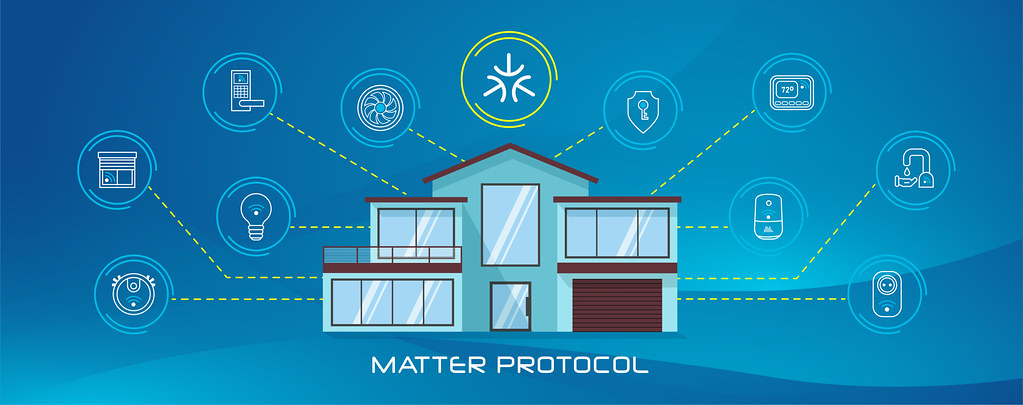
The good news is that this decision matters less than it did a few years ago, thanks to the Matter standard bringing more cross-compatibility to the table. The bad news, though, is that «less important» doesn’t mean «unimportant.» There are still real differences between Alexa vs Google Home vs Apple HomeKit that are worth understanding before you commit.
So let’s go through them honestly, without the marketing spin.
The Short Answer
If you want the quick version before we get into the details:
- Choose Alexa if you want the widest device selection, the cheapest hardware, and don’t mind a slightly less polished app experience.
- Choose Google Home if you’re already living in the Android/Google ecosystem and want the best voice recognition and the smoothest day-to-day experience.
- Choose Apple HomeKit if privacy is your top priority and you’re already deep into iPhones, iPads, and Macs. Just be ready to pay a bit more for compatible hardware.
Now let’s unpack why.
Amazon Alexa
Alexa has been around the longest in its current form, and it shows, mostly in a good way. It has by far the largest catalog of compatible third-party devices, which matters a lot in practice. In other words, whatever brand of smart plug, bulb, or lock you find on a store shelf, there’s a very good chance it works with Alexa.
What Alexa does well:
- The broadest third-party device support of the three ecosystems.
- The cheapest entry-level hardware. Echo Dot speakers regularly go on sale for well under $30.
- Skills and routines are flexible once you get the hang of building them.
- Frequent software updates and new features, rolled out aggressively.
Where it falls short:
- The app can feel cluttered. As a result, finding a specific device or routine buried in menus is a common complaint.
- Voice recognition, while good, is generally considered a step behind Google’s.
- Amazon’s approach to user data has drawn more privacy criticism than Google’s or Apple’s, so this matters if privacy is a priority for you.
Best for: people who want maximum device flexibility and the lowest upfront cost, and who don’t mind managing routines through a slightly busier app.
Google Home (Google Assistant)
Google’s strength has always been the assistant itself. Specifically, the actual voice recognition and natural language understanding tends to be the most reliable of the three, especially with follow-up questions and conversational commands.
What Google Home does well:
- Best-in-class voice recognition and natural language processing.
- Tight integration with Android phones, Google Calendar, Gmail, and Google Maps, which is useful for routines like «how long until I need to leave.»
- A cleaner, more intuitive app than Alexa’s, according to most user feedback.
- Strong support for Matter devices out of the box.
Where it falls short:
- Slightly smaller third-party device catalog than Alexa, although the gap has narrowed significantly.
- Google has a track record of discontinuing products and services, which understandably makes some buyers cautious about long-term support.
- Like Alexa, data privacy is a consideration. After all, Google’s business model is built on data, even if its smart home privacy controls are reasonably transparent.
Best for: Android users who want the smoothest voice experience and don’t mind a somewhat smaller, but still large, device selection.
Apple HomeKit
HomeKit has historically been the «walled garden» option. It offers fewer compatible devices, but it also delivers the tightest security and privacy standards of the three by a clear margin. That gap has closed somewhat with Matter, though, since it lets many more devices work with HomeKit than before.
What HomeKit does well:
- The strongest privacy and security architecture. Most device data processing happens locally on your devices rather than in the cloud.
- Deep, seamless integration if you already use iPhone, iPad, Apple Watch, and Mac.
- The Home app is clean, simple, and consistent across all Apple devices.
- Automations tied to location (geofencing) tend to be more reliable than on the other two platforms.
Where it falls short:
- Compatible hardware is often 15-30% more expensive than Alexa or Google equivalents, partly due to certification requirements Apple places on manufacturers.
- There’s no standalone Apple smart speaker at the budget end. The HomePod mini is the cheapest entry point, and it still costs more than an Echo Dot or Nest Mini.
- If anyone in your household uses Android, they lose a meaningful chunk of the experience, since HomeKit is Apple-only.
Best for: existing Apple households who prioritize privacy and don’t mind paying a premium for certified hardware.
Side-by-Side Comparison
| Amazon Alexa | Google Home | Apple HomeKit | |
|---|---|---|---|
| Device compatibility | Widest | Wide, growing fast | Narrower, growing via Matter |
| Entry-level speaker price | Lowest | Low | Higher (HomePod mini) |
| Voice recognition | Good | Best | Good |
| Privacy approach | Weakest of the three | Moderate | Strongest |
| Best for | Device flexibility, budget | Android users, voice quality | Apple households, privacy |
| App experience | Cluttered but powerful | Clean and intuitive | Clean and simple |
Does Matter Change the Decision?
Partly, yes. Matter is a shared standard that many manufacturers are adopting, so a single device can work across Alexa, Google Home, and HomeKit without needing a separate hub or app for each ecosystem. In practice, this means a growing share of new smart plugs, bulbs, and locks released from 2024 onward will work reasonably well no matter which assistant you choose.
That said, Matter doesn’t erase the differences between the three platforms. Voice recognition quality, app design, and privacy approach are still tied to the ecosystem itself, not to the device. So think of Matter as lowering the cost of switching later, rather than making the initial choice irrelevant.
Can You Mix Ecosystems?
Technically, yes. For example, plenty of people run an Echo speaker in the kitchen and a HomeKit-based lock on the front door. However, we wouldn’t recommend it as a starting strategy for a beginner. Mixing ecosystems means managing multiple apps and occasionally troubleshooting devices that don’t automate cleanly across platforms. In short, it’s generally more friction than most people want to deal with early on.
Our advice: pick one ecosystem as your «primary» system for voice control and automations, and treat any secondary devices as the exception rather than the rule.
Our Recommendation by Household Type
- Renting or on a tight budget, no strong phone preference? Go with Alexa. It has the cheapest hardware, the biggest device catalog, and it’s the easiest to expand later.
- Android phone, want the smoothest daily experience? Go with Google Home for the best voice recognition and app design.
- iPhone household, and privacy matters to you? Go with Apple HomeKit. It’s worth the premium if you’re already inside the Apple ecosystem.
- Mixed household with some iPhone, some Android? Alexa or Google Home tend to work better as a shared «default,» since HomeKit is Apple-exclusive and will frustrate any Android users in the house.
Final Thoughts
There’s no universally «correct» answer to the Alexa vs Google Home vs Apple HomeKit question. Instead, the right choice depends more on what phones your household already uses and how much you value privacy versus flexibility than on any objective ranking. If you’re still unsure, Alexa is the safest default for most first-time buyers, simply because of its device catalog and price point. That said, if you’re fully inside the Apple ecosystem already, there’s a strong case for skipping the detour and going straight to HomeKit.
Whichever you choose, thanks to Matter, you’re taking on far less risk than smart home buyers did even a couple of years ago. In other words, switching later is no longer the all-or-nothing decision it used to be.
Ready to start buying? Check out our guide to the best smart home starter kits under $100 for picks that work well within each ecosystem.