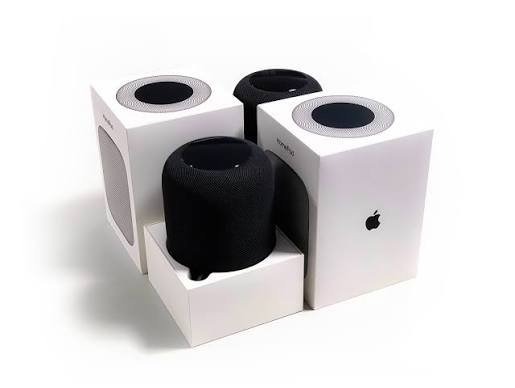
Apple never sells the HomePod as a hub. It sells a speaker, and the hub abilities arrive quietly as part of the package. That silence hides one of the smart home’s best values and one of its biggest traps. For Apple households, the HomePod runs HomeKit automations, anchors a Thread network, and powers secure video, all while playing music. For everyone else, it is an expensive speaker that ignores their devices. We covered the broader hub landscape in our best smart home hubs guide. This article answers the specific question: is an Apple HomePod as a smart home hub actually worth it?
Apple HomePod as a Smart Home Hub: The Short Answer
Yes, if you live inside the Apple ecosystem, and no, if you don’t. The HomePod is a hub for HomeKit and Matter devices only. That makes it brilliant for iPhone households and useless for homes built on other platforms. Within Apple’s world, the value is real: automations run locally, Thread devices connect reliably, and HomeKit Secure Video gets the always-on hub it requires.
The catch is scope. The HomePod has no Zigbee or Z-Wave radios, no open API, and no appetite for brands that skip HomeKit or Matter support. Therefore, the worth question is really an ecosystem question, and the answer comes from your other devices, not from the speaker itself.
In other words, the HomePod is the best hub for the Apple home, and a decorative paperweight in everyone else’s. That blunt split is the whole review in one sentence.
What the HomePod Actually Does as a Hub
Behind the music, the HomePod performs several hub jobs:
- Runs HomeKit automations locally. Scenes and automations execute on the speaker itself, which keeps them fast and working during internet hiccups.
- Acts as a Thread border router. Thread devices join the mesh through the HomePod, which strengthens Matter networks across the home.
- Enables HomeKit Secure Video. Camera footage is analyzed locally and stored in encrypted iCloud, but only when a home hub is present.
- Provides remote access. With a hub at home, your Apple devices control the house from anywhere.
- Backs up other hubs. In a multi-HomePod home, one takes the lead and another stands ready if it fails.
Every HomePod model performs these duties, including the compact HomePod mini. That’s why Apple positions the mini as the budget entry into its smart home.
What the HomePod Does NOT Do
The limits matter as much as the features:
- No Zigbee or Z-Wave. The vast legacy world of mesh sensors and locks is invisible to the HomePod.
- No direct control of non-HomeKit devices. A brand that supports Alexa but not HomeKit stays outside the system, full stop.
- No open automations. HomeKit’s automation logic is capable but deliberately simple, with nothing like the rule engines of dedicated hubs.
- No assistant for other platforms. Siri answers Apple requests, and Android users have no reason to engage.
These limits define the buyer. If your home already mixes brands and radios freely, the HomePod will frustrate rather than unite, and a dedicated hub serves better.
Picture a mixed home: Zigbee sensors, a Z-Wave lock, and Wi-Fi plugs from four brands. The HomePod sees none of them unless each vendor exposes the device through HomeKit or Matter. Bridges can help, since an Aqara-style hub can present its sensors to HomeKit, but every bridge adds another box and another failure point. The Apple home is happiest when it is built deliberately from compatible parts, not assembled from whatever was on sale.
Building the Apple Home: What Pairs Well
If the HomePod will be your hub, choose accessories that speak its language:
- HomeKit-native brands. Look for the Works with Apple Home badge, which guarantees the accessory joins the Home app without tricks.
- Thread-native accessories. Sensors and bulbs that use Thread connect directly to the HomePod’s border router, with fast responses and low power use.
- Matter-certified devices. The modern standard joins Apple’s world cleanly, and the catalog keeps growing.
- Bridges for legacy gear. Lutron Caséta, ecobee, and Aqara all expose their ecosystems to HomeKit through their own hubs, which keeps older devices useful.
The pattern is simple: fewer brands, each with clean HomeKit support, makes the HomePod shine. The moment a device requires a workaround, the Apple hub stops being the easy answer. That discipline also keeps the setup reliable, since every clean integration removes a future troubleshooting session.
HomePod vs Apple TV vs Dedicated Hubs
The HomePod is not Apple’s only hub, and it is not even the cheapest one. Newer Apple TV 4K models also act as Home hubs and Thread border routers. Households that already own one can skip the speaker entirely if hub duties are the only goal.
Compare that with dedicated hubs and the roles split cleanly. A SmartThings-style hub covers Zigbee, Z-Wave, and Matter with a mainstream app. Home Assistant and its peers offer unlimited automation for tinkerers. The HomePod covers Apple’s world with the least effort and the best voice, but it competes only inside that world. The honest framing: the HomePod is a speaker that happens to be a hub, while dedicated hubs are hubs that happen to be boxes.
Mini Question: Which HomePod?
A hub duties are identical across the lineup, so the choice comes down to audio. The HomePod mini delivers surprisingly full sound for its size and fits kitchens, bedrooms, and desks. The full-size HomePod adds real bass and fills living rooms, at a meaningfully higher price. If the hub role is the priority, the mini wins. You can place several around the house for the price of one large speaker, and each one strengthens the Thread mesh.
Setup and the Home App Reality
Adding a HomePod to the hub rotation takes minutes through the Home app, and the phone handles everything. The same app manages automations, scenes, and accessory access, with a clean logic that families learn quickly. HomeKit’s reliability has improved steadily, and Thread accessories respond faster and drop less often than older Wi-Fi gear. Legacy accessories still occasionally report «no response,» and the classic fixes, restarting the accessory or the hub, usually resolve it.
One reality deserves mention: when multiple Home hubs exist, Apple picks one as active automatically, and users cannot choose. In practice it works, but enthusiasts who want control over which device runs their automations will find HomeKit’s hand-holding frustrating compared with dedicated hubs.
The Real Cost Calculation
Run the numbers honestly. If you want a smart speaker anyway, the hub abilities are a free bonus, which makes the mini an easy recommendation for Apple households. If you need hub duties and already own an Apple TV, the correct purchase is nothing at all. If you are buying a HomePod solely to run a smart home, compare its price against a dedicated hub. Most of them cost less and control more radios.
There is also a lock-in cost that never appears on the receipt. Once the automations, cameras, and Thread network run through Apple gear, leaving the ecosystem means rebuilding. That stickiness is fine for committed Apple users and a real trap for the undecided. If music matters more than automation, the full-size HomePod still earns its price as a speaker, with the hub role as a bonus.
The Privacy Angle
Privacy is where the HomePod shines. HomeKit automations run locally, Thread traffic stays on the mesh, and HomeKit Secure Video processes footage on the home hub before storing it encrypted. Apple’s model sells no ads on your home data, which contrasts sharply with assistant platforms built around advertising. For privacy-minded Apple households, that difference alone can justify the purchase.
A fair caveat: local processing describes HomeKit itself, not every accessory behind a bridge. Bridged devices may still phone their own vendors’ clouds, so the HomePod is only as private as the accessories it controls. Check each device’s cloud habits before trusting the whole chain.
Common Questions, Short Answers
- Do I need a HomePod if I only have a few lights? No. Matter and Wi-Fi lights work from the Home app without a hub, though automations then depend on your phone or a home hub.
- Will one HomePod mini cover a whole house? One hub runs the automations from anywhere, but Thread range is room-sized, so large homes benefit from a border router in each area.
- Can HomePods control non-Apple devices? Only through HomeKit or Matter support, which is why checking the badge before buying matters.
- Does a HomePod replace the router? No. Thread helps low-power devices, but Wi-Fi range stays the router’s job.
- Is the hub role tied to the speaker working? Yes, since the HomePod is the hub, but Apple rotates duties across all hubs, so an Apple TV can take over if one fails.
Who Should Buy It
- Apple household that wants a speaker → buy the HomePod mini, and enjoy the hub as a bonus.
- Apple household that needs a hub and owns an Apple TV → buy nothing; the TV already does the job.
- Mixed-brand home with Zigbee or Z-Wave gear → skip the HomePod, and choose a dedicated hub instead.
- Tinkerer who wants unlimited automations → skip it, and run Home Assistant or Homey.
- Privacy-first Apple family → yes, especially with HomeKit Secure Video cameras.
- Android household → no, and the Echo vs Google comparison points to better options.
Final Thoughts
Is an Apple HomePod as a smart home hub worth it? The answer is ecosystem-shaped. For Apple households, the mini is arguably the best value in the entire smart home. It bundles a good speaker, a HomeKit hub, a Thread border router, and a privacy story into one small puck. For everyone else, it is the wrong tool at the wrong price. Judge it by the devices you already own. A hub only earns its place by serving what you have, not what the brand hopes you will buy next.
If the Apple path isn’t yours, the alternative routes are well mapped. Our best smart speakers guide covers the full speaker field, including where the HomePod fits against it.