If you rent, a lot of standard smart home advice simply does not apply to you. You cannot swap a thermostat, chase cable through a hallway, or cut a hole for a ceiling camera without a conversation you would rather avoid. The reassuring part is that most useful categories no longer need any of that. This guide covers smart home devices for renters that plug in, stick on, or sit on a shelf. It also covers how to take every one of them with you.
Why Renting Is No Longer a Real Limitation
Manufacturers have spent several years shifting toward battery power and adhesive mounting. That push was aimed at convenience rather than tenancy law, but renters gain more from it than anyone. A device that runs on batteries and talks over Wi-Fi or Thread needs no electrician, no new circuit, and no permission. The idea that renters cannot automate a home sits alongside other common smart home myths, and it deserves the same treatment.
The trade-off is real, though. Battery devices ask for more maintenance and often for a cloud subscription. Mains-powered versions usually cost less to run and stay online more reliably. In a rental, reversibility tends to outweigh both advantages, at least while you still move every couple of years.
There is a legal layer as well. Most leases allow small, reversible changes and forbid anything that alters the unit’s fixtures. The practical dividing line is whether you have made a hole, touched wiring, or changed something the next tenant inherits. If a device fails all three tests, assume you need written permission first.
Three Tests That Decide Whether a Device Is Renter-Safe
Before you buy anything, run it through three quick questions. They take a minute and prevent most deposit arguments.
- Does it need a hole? Screws, anchors and wall plugs leave evidence behind. Adhesive pads and free-standing bases do not, as long as you remove them correctly.
- Does it touch mains wiring or plumbing? Anything hardwired into the building’s circuits is the landlord’s territory, even when the job looks simple.
- Can you undo it completely? If restoring the original state needs a professional, the device is not renter-friendly, however small it is.
Two secondary criteria matter too. Does the device still work if you move somewhere with weaker Wi-Fi? Does it keep functioning when your internet drops? A battery camera that records to a local card carries on during an outage. A cloud-only camera becomes a paperweight, which is a genuine weak point in any security plan.
Smart Home Devices for Renters That Need Zero Drilling
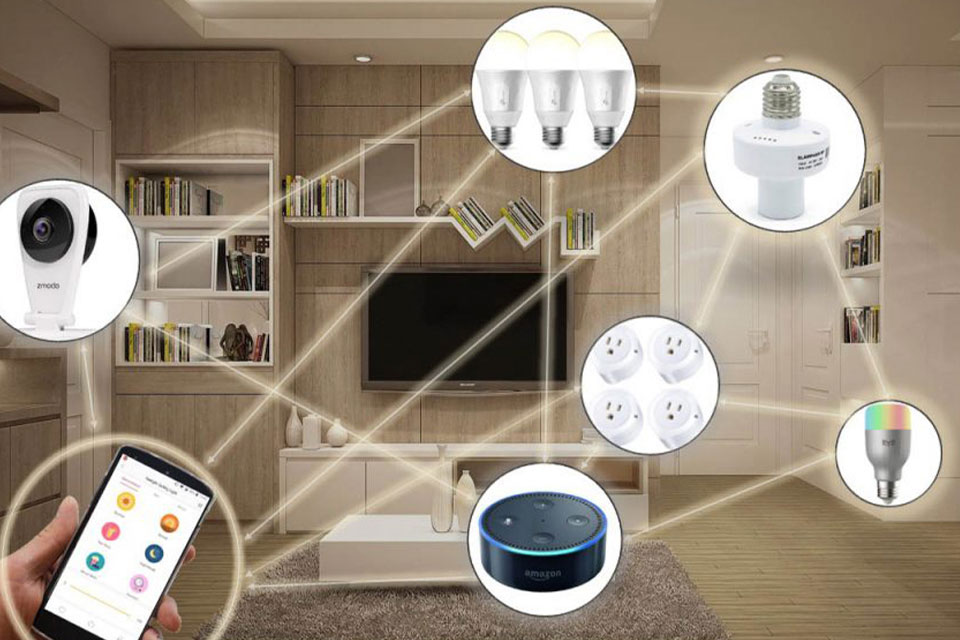
The categories below cover lighting, convenience, monitoring and basic security. None of them require a drill, and all of them fit in one box on moving day.
Smart Plugs: The Safest Starting Point
A smart plug sits between the appliance and the wall socket. It controls lamps, fans and chargers by cutting or restoring power. Nothing needs installing, and nothing needs reversing. The limits are physical rather than technical. The plug needs an outlet within reach, and the appliance needs its mechanical switch left on. If you are starting from zero, this is the first purchase worth making. Our guide to building a smart home on a budget shows how quickly a useful setup grows from there.
Smart Bulbs and Plug-In Lighting
Smart bulbs screw into standard fittings. You can change the feel of a whole flat in an afternoon and swap the original bulbs back in minutes. Two caveats are worth knowing. Some enclosed fixtures trap heat and shorten LED life. Older dimmer switches also confuse smart bulbs unless the dimming happens inside the bulb itself. If a room has no ceiling fitting you can reach, plug-in light strips and floor lamps are the easier route.
Battery Cameras and Stand-Mounted Options
Battery cameras remove the cable problem entirely. Many ship with a magnetic base or a simple stand, turning a shelf, bookcase or windowsill into a camera position. Adhesive mounts work as well, though the surface matters more than the adhesive. Painted trim and wallpaper can lift when a strip is pulled too fast. Warm the pad slightly in cold weather and pull the tab along the wall rather than away from it.
Battery Video Doorbells
Traditional doorbells draw power from the building’s wiring. Battery versions sidestep that, and several manufacturers sell them with adhesive or screw-free mounting plates. In a shared building there is a second gate: the front door is usually common property. Even a fully reversible doorbell may need the landlord’s or the building manager’s agreement. Ask before you mount anything facing the corridor.
Contact, Motion and Leak Sensors
Small sensors attach with adhesive pads and report whether a door, window or cabinet is open. Leak sensors sit under a sink or beside a washing machine and warn you before water spreads. These are the cheapest way to add real information to a setup, and the easiest devices to relocate later. The catch is protocol. Most low-power sensors are Zigbee, Z-Wave or Thread devices. They often need a hub or bridge to reach your phone.
Smart Speakers and Displays
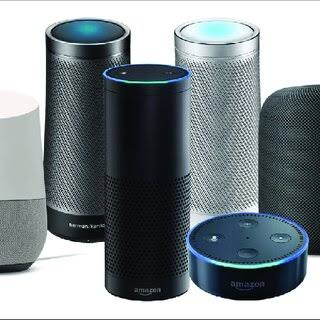
A speaker or display plugs into a socket and joins your Wi-Fi. There is nothing to install in any sense of the word, and it becomes the voice control layer for everything else. These are also the devices most worth carrying through several moves. They work with almost any other brand you buy later.
Renter-Friendly and Landlord-Approval Categories Compared
The table below is the short version of this article. Use it as a filter before anything goes into a shopping basket.
| Category | Permanent change? | Reversible when you leave? | Main caveat |
|---|---|---|---|
| Smart plugs | None | Unplug and pack | Needs an outlet near the lamp or appliance |
| Smart bulbs | None | Screw the original bulb back in | Enclosed fixtures run hotter and shorten LED life |
| Battery cameras on a stand | None | Lift and pack | Battery swaps plus a possible cloud subscription |
| Adhesive doorbell cameras | Adhesive residue only | Usually, with slow removal | Shared entrances may need building permission |
| Contact and motion sensors | Adhesive pads | Yes, with care on painted trim | Often needs a hub or bridge for automations |
| Smart speakers and displays | None | Unplug | Occupies an outlet and shares your network |
| Smart thermostats | Yes, HVAC wiring | Only if reinstalled correctly | Landlord approval and compatible wiring |
| Hardwired video doorbells | Yes, doorbell wiring | Rarely practical | Building or landlord permission |
| Smart locks replacing a deadbolt | Yes, the lock body | Only by restoring original hardware | Leases often treat locks as safety fixtures |
| In-wall smart switches | Yes, mains wiring | No, unless an electrician reverses it | Needs an electrician and written approval |
Hubs, Matter, Thread and Wi-Fi Bands
Compatibility is where renter setups usually go wrong, and installation has nothing to do with it. Three details are worth checking before you buy.
- Hubs and bridges. Some devices connect straight to Wi-Fi and need nothing else. Others need a hub to translate a low-power radio signal into something your phone understands. That is why whether you need a hub is worth settling before a first purchase. A hub is a small box you plug in, so it breaks no rules.
- Matter and Thread. Matter is a shared standard that lets devices from different brands work in one app. It is administered through the Connectivity Standards Alliance. Thread is the low-power mesh radio behind it, which battery sensors use to relay messages. Many newer hubs support both, which reduces the risk of buying into a dead end.
- Wi-Fi bands. A large share of budget smart devices only see the 2.4 GHz band. If your router broadcasts one combined network name, setup can fail again and again. Splitting the bands, or creating a temporary 2.4 GHz network, normally resolves it.
Thread matters more for renters than it first appears. A mesh of battery sensors strengthens itself as you add devices, and it keeps working when Wi-Fi drops. Thread Group’s own explanation of the standard sets out how the self-healing mesh behaves. That is useful when two models look identical on the shelf. Meanwhile, a Matter-compatible device should be easier to keep when you change ecosystems.
What a Renter Setup Really Costs to Own
The sticker price is the least interesting number. Three ongoing costs decide whether a setup stays pleasant a year later.
- Subscriptions. Cameras and doorbells often include live viewing for free, then charge monthly for recorded history. Local storage on a card or through a hub removes that bill.
- Batteries. Doorbells and cameras are the hungriest devices in a rental setup. Rechargeable packs cut the long-term cost, but only if you remember to charge them.
- Replacements and moves. Adhesive pads, mounting plates and cheap bulbs rarely survive every move intact. Budget for a small refresh each time, not just at the start.
Energy use is the quiet factor. Standby draw from a dozen small devices adds up over a year. Grouping always-on gadgets onto a couple of sockets lets you switch them off together.
What to Ask Your Landlord Before You Install Anything
Ask in writing, even in a short message, and keep the reply. A landlord is far more likely to agree to a reversible device. It also protects you at deposit time.
- Does the lease allow adhesive mounts on painted surfaces?
- Is the front door or corridor shared with other tenants?
- Will the device run on your own network, or must it use the building’s?
- Who is responsible if something is damaged while you live there?
If the answer is no to a hardwired device, ask about the battery equivalent instead. It often solves the same problem without the argument. If a job needs an electrician, that is usually the sign a device belongs in the later list. Thermostats are the clearest example, because wiring varies by system and a mistake affects the whole unit.
Mistakes That Cost Renters Money and Deposits
- Buying a hardwired device first. Landlords rarely approve mains work for a tenant, and the return window may close before you find out.
- Ignoring the hub requirement. A cheap sensor becomes an expensive ornament if nothing in your home can talk to it.
- Mounting on difficult surfaces. Fresh paint, wallpaper and textured trim are the three surfaces that fail most often.
- Leaving default passwords. The FTC’s guidance on connected devices starts with changing default credentials and enabling automatic updates. A camera on a shared building network deserves exactly that attention.
- Forgetting the move-out state. If you cannot name where the original bulb or lock hardware went, you will be buying replacements.
Leaving No Trace: A Move-Out Checklist
- Unpair every device in its app before packing it, so the next home does not fight over an old account.
- Remove adhesive slowly and clean residue with warm soapy water rather than a scraper.
- Refit original bulbs, screws and lock hardware, then test them once.
- Photograph walls, trims and door frames in daylight after the devices are gone.
- Cancel subscriptions you no longer need and delete the stored clips.
Frequently Asked Questions
Can I have a smart home in a rented apartment?
Yes, and most of it needs no permission. Plugs, bulbs, speakers, sensors and battery cameras all work without touching the building’s structure. Ask first only for devices that involve wiring or shared areas such as an entrance hall.
Do smart home devices for renters need a hub?
Not always. Wi-Fi devices normally connect on their own. Low-power sensors often need a hub or bridge, because their radios cannot talk to a router directly. Check that requirement before you buy rather than after the box is open.
Will adhesive mounts damage the walls?
They can, mainly on fresh paint, wallpaper or textured surfaces. The removal technique matters as much as the product. Pull slowly and parallel to the wall, and warm the pad first in cold weather.
Are battery cameras good enough for security?
For a flat or a single entrance, a well-placed battery camera with local storage covers the basics. Coverage and recording history are the trade-offs, because battery models record short clips to preserve power.
What if my landlord says no?
Ask what specifically concerns them. Objections usually target holes, wiring or liability. Offering a battery alternative with no fixings, or promising to restore the original state, resolves a surprising share of those conversations.
Should I buy cheap devices now or wait until I own a home?
Buy for the place you live in now. Renter-friendly categories are the ones that transfer easily between homes. Money spent on plugs, bulbs and speakers rarely goes to waste, and the rest can wait.
Final Thoughts
Renting limits what you can do to the building, not what you can automate inside it. Start with plugs and bulbs for lighting and control. Add sensors and a battery camera where security matters, and keep every receipt and original part in one box. The setup that survives a tenancy is the one you can dismantle in an hour without a repair bill.
If the security layer is next, our guide to the best indoor security cameras for pet and baby monitoring covers models that need no installation.
Updated 27 September 2026: this guide was rewritten and expanded, with a decision checklist, a comparison table, compatibility notes and an FAQ added.
Written by Ángel D. Serrano, who runs Automating Our Home. Finishing a philosophy degree, a patient reader of manuals, and the person who has broken more smart plugs than he will admit. He writes the guides so you only have to decide once.